
Pivot Report Data Center to Cloud migration is performed using the Jira Cloud Migration Assistant, available on the Atlassian Marketplace. The process is fully automated but comes with certain limitations—some types of data are not migrated. For this assistant, Atlassian provides a full guide on Jira Center to Cloud migration, which lists possible limitations.
After migration, all essential data for Pivot Report will be available in the Cloud, although some manual adjustments may still be needed.
When will support for Jira Data Center end?
As of March 30, 2026, new Atlassian customers will no longer be able to purchase or request a quote for impacted Data Center products or associated Data Center app licenses, as shown in the timeline appearing in the related article.
As of March 30, 2028, existing Atlassian customers will no longer be able to purchase impacted Data Center products and associated Data Center app licenses. Additionally, customers will not be able to purchase expansions to existing licenses.
As of March 28, 2029, Data Center subscriptions and any associated Marketplace apps will expire. Atlassian support and bug fixes will no longer be available for your Data Center products and apps, and any renewals will be prorated to match this date.
What app features are excluded in Jira Data Center?
Pivot Report follows a Cloud-first approach, meaning new features are first released in the Cloud version before being added to the Data Center version. Except for Widgets—which are exclusive to Cloud—both versions offer the same functionality.
What app data gets migrated?
When migrating from Jira Data Center to Jira Cloud, Pivot Report’s app settings and all saved reports are transferred.
For more information on how application settings, saved reports, source settings, sharing settings, tab settings, slice settings, and hierarchy settings are affected during the migration, refer to the tables below.
Application Settings
|
What is migrated |
Notes |
|---|---|
|
Projects (Spaces) |
Migrated by short name/keys, like PR, WL, TT, etc.
In such cases, you might need to remove app settings from the projects that are exported to the Cloud. |
|
Issue Types (Work Types) |
Migrated through Jira Cloud Migration Assistant Mapping API. Should function smoothly without any additional adjustments. |
|
Users |
Migrated through Jira Cloud Migration Assistant Mapping API. Should function smoothly without any additional adjustments. |
|
Groups |
Migrated based on names. Please note that not all user groups may be migrated. You will need to remove any unused groups after the migration is complete. |
|
Issue Links (Work item Links) |
Migrated through Jira Cloud Migration Assistant Mapping API. Should function smoothly without any additional adjustments. |
Saved reports
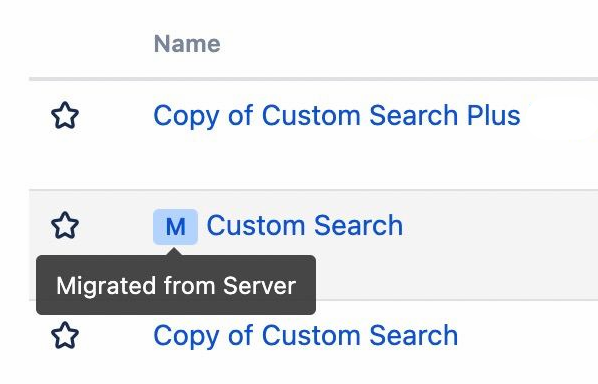
When reports are migrated from your Data Center instance, they will be marked with a blue 'M' icon, visible to the left of report names in the Manage Pivot Reports page.
After saving the report in your Cloud instance, this icon is removed.
Source Settings
|
What is migrated |
Notes |
|---|---|
|
Issue (Work item) |
Issues are migrated using their keys (e.g., PR-123, WL-456, TT-789, etc.). You may need to delete some of the saved reports, if the source projects are not migrated. |
|
Saved Filter |
Jira Cloud Migration Assistant only supports default filters (for example: Created Recently) and filters used in boards. Other filters are ignored. |
|
JQL |
Jira Cloud Migration Assistant migrates JQL as a text string. You will need to manually check all JQLs used for sources and slices, after the migration is complete. |
|
Board |
Migrated using Jira Cloud Migration Assistant Mapping API. It should work smoothly without requiring any additional adjustments. |
|
Structure |
Not supported in Cloud |
Sharing Settings
|
What is migrated |
Notes |
|---|---|
|
Users |
Migrated using Jira Cloud Migration Assistant Mapping API. It should work smoothly without requiring any additional adjustments. |
|
Groups |
Migrated based on names. After migration, remove any unused user groups if not all are migrated. |
Tabs Settings
Tab configuration is completely migrated, including the number of tabs, their names, order, and types. Although, specific tab options may depend on the fields in the target instance, so it's advisable to review the report after the migration is complete.
Slices Settings
|
What is migrated |
Notes |
|---|---|
|
Custom Fields |
Migrated using Jira Cloud Migration Assistant Mapping API. It should work smoothly without requiring any additional adjustments. |
Hierarchy Settings
|
What is migrated |
Notes |
|---|---|
|
Issue Types (Work Types) |
Migrated using Jira Cloud Migration Assistant Mapping API. It should work smoothly without requiring any additional adjustments. |
|
Issue Links (Work item Links) |
Migrated using Jira Cloud Migration Assistant Mapping API. It should work smoothly without requiring any additional adjustments. |
Can Colined help you migrate the app?
If you have questions or need assistance, contact our support team via email or service desk. Our team is available Monday through Friday (9:00 AM to 7:00 PM GMT+7) to help with technical challenges or discuss improvements.