
How can you start using Worklogs Report?
You can start using Worklogs Report immediately after installing it, without any additional setup. To learn how to create reports, refer to the related article.
Where can you find reports?
You can find all reports from a central location, as described in the related article.
Alternatively, you can create a shortcut that keeps a report synchronized with a board or space by following the steps in another related article.
FAQ
Troubleshooting
Why can't you find the app inside a project's navigation?
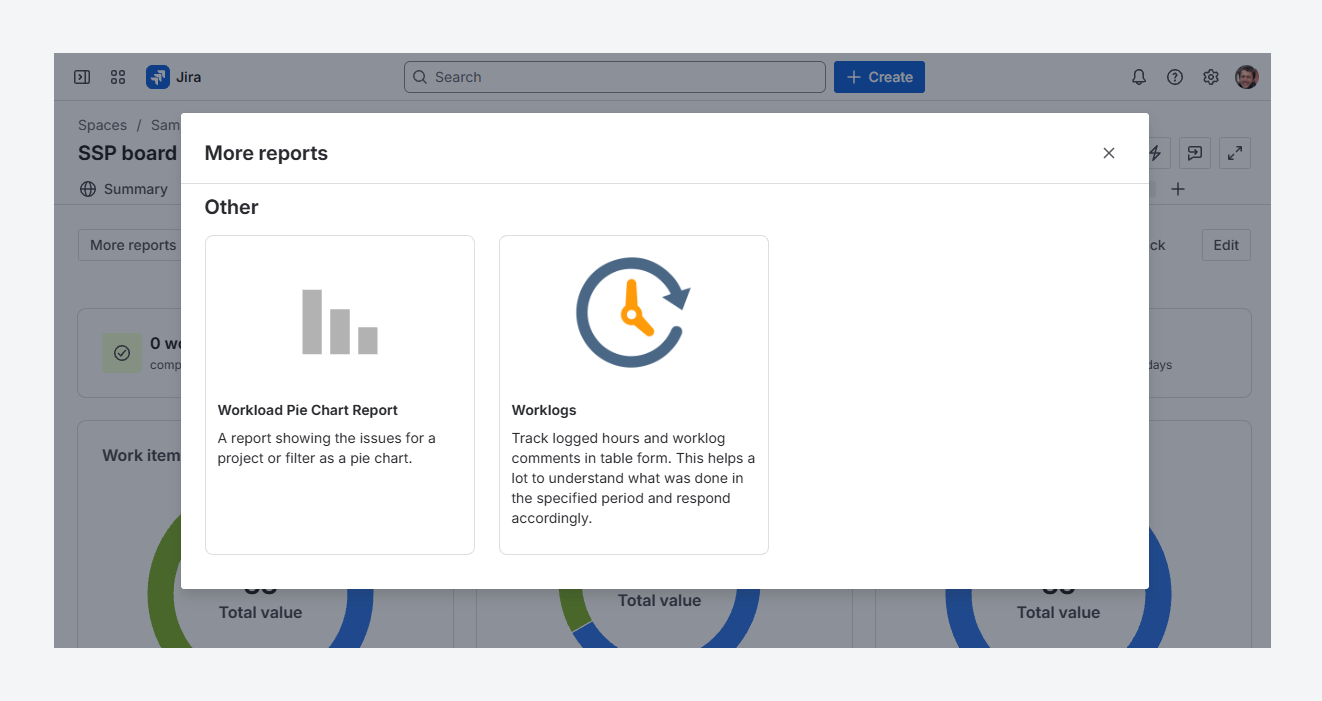
The screenshot above shows Worklogs Report alongside the other report options in a space's navigation on Jira Cloud.
1. To access the app in Jira, select a space from Jira's sidebar. In the board navigation, click Reports, then More reports. In the More reports dialog, locate Worklogs in the Other section.
2. To access the app in Jira Service Management (JSM), select a space from Jira's sidebar, then choose Worklogs Report from the space navigation.
If you see an error after following these steps, refer to the steps in the related article, since you may have lost access to the app.
To avoid opening the app each time you need to find a report, create a shortcut that keeps the report in sync with a board or space by following the steps in a related article.
If you have questions or need assistance, contact our support team via email or service desk. Our team is available Monday through Friday (9:00 AM to 7:00 PM GMT+7) to help with technical challenges or discuss improvements.