
This article explains how to use Work Ratio indicator within the Breakdown section of a report.
Why should you use the Work Ratio?
The Work Ratio indicator helps you understand how much of the current estimate has been spent, rather than relying only on the original estimate. This makes it easier to measure progress when logged time and remaining time change, or when scope is added or removed.
For example, suppose you begin work on a task originally estimated at 10 hours. After spending 5 hours, you determine that more effort is required and increase the Remaining Time.
As a result, the combined total of Time Spent and Time Remaining increases from 10 hours to a current estimate of 15 hours.
The Work Ratio indicator expresses how much work has been completed relative to the current estimate.
It can be used as a measure of actual progress and compared against milestones or baseline target, such as reaching 50% completion by a certain date in a sprint or release. If the indicator falls behind the target, it can act as an early warning that the release may be at risk of delay.
How is the Work Ratio indicator calculated?
The Work Ratio is calculated using this formula:
Work Ratio = [Spent Time / (Spent Time + Remaining Time)] × 100%
What is shown within the indicator?
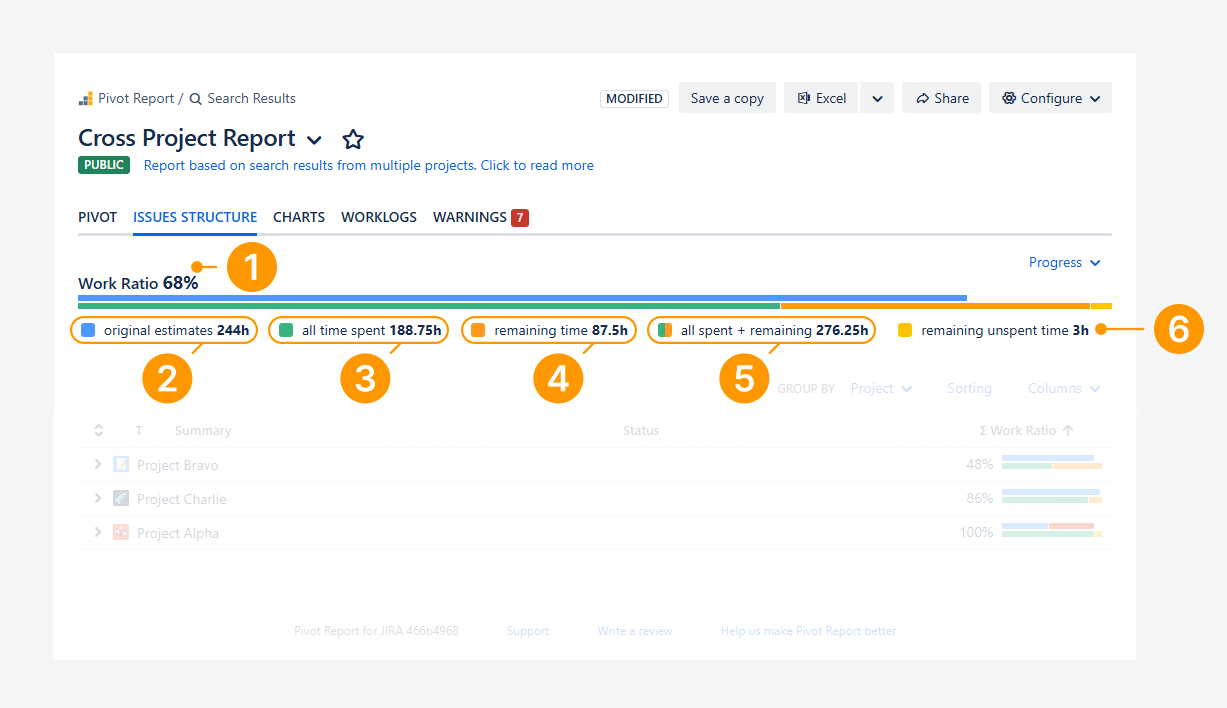
The Work Ratio progress indicator displays the following six elements:
-
Work Ratio: This value is obtained by dividing All time spent by All spent + remaining. In the example, this equals 68% (188.75 / 276.25).
-
Original estimates: This value represents the estimated effort required to complete a work item or group of work items. When a work item is created, Time Spent is empty and Time Remaining matches the original estimate. The combined value of Time Spent and Time Remaining continues to match the original estimate until the estimate is exceeded or the work item is closed before all estimated effort is consumed. In the example above, the total is 244 hours, based on the sum of estimates for all work items in the report.
-
All time spent: This value represents the total amount of time logged across work items. In the example, the total logged time is 188.75 hours.
-
Remaining time: This reflects the work still to be completed. In many cases, Jira automatically reduces this value as time is logged. However, if the original estimate is exceeded, it can also be updated manually. In the example, the remaining effort totals 87.5 hours.
-
All spent + remaining: This value represents the combined total of Time Spent and Time Remaining. In the example, this equals 276.25 hours (188.75 + 87.5). When this value exceeds the Original Estimate, indicated by the stacked bar extending beyond the Original Estimate threshold, it signals that the estimate has been overspent.
-
Remaining unspent time: This value represents remaining time on closed work items where it was not reset to zero upon resolution or not manually updated. In the example, this totals 3 hours.
FAQ
Why is Work Ratio 100% once the issue is closed?
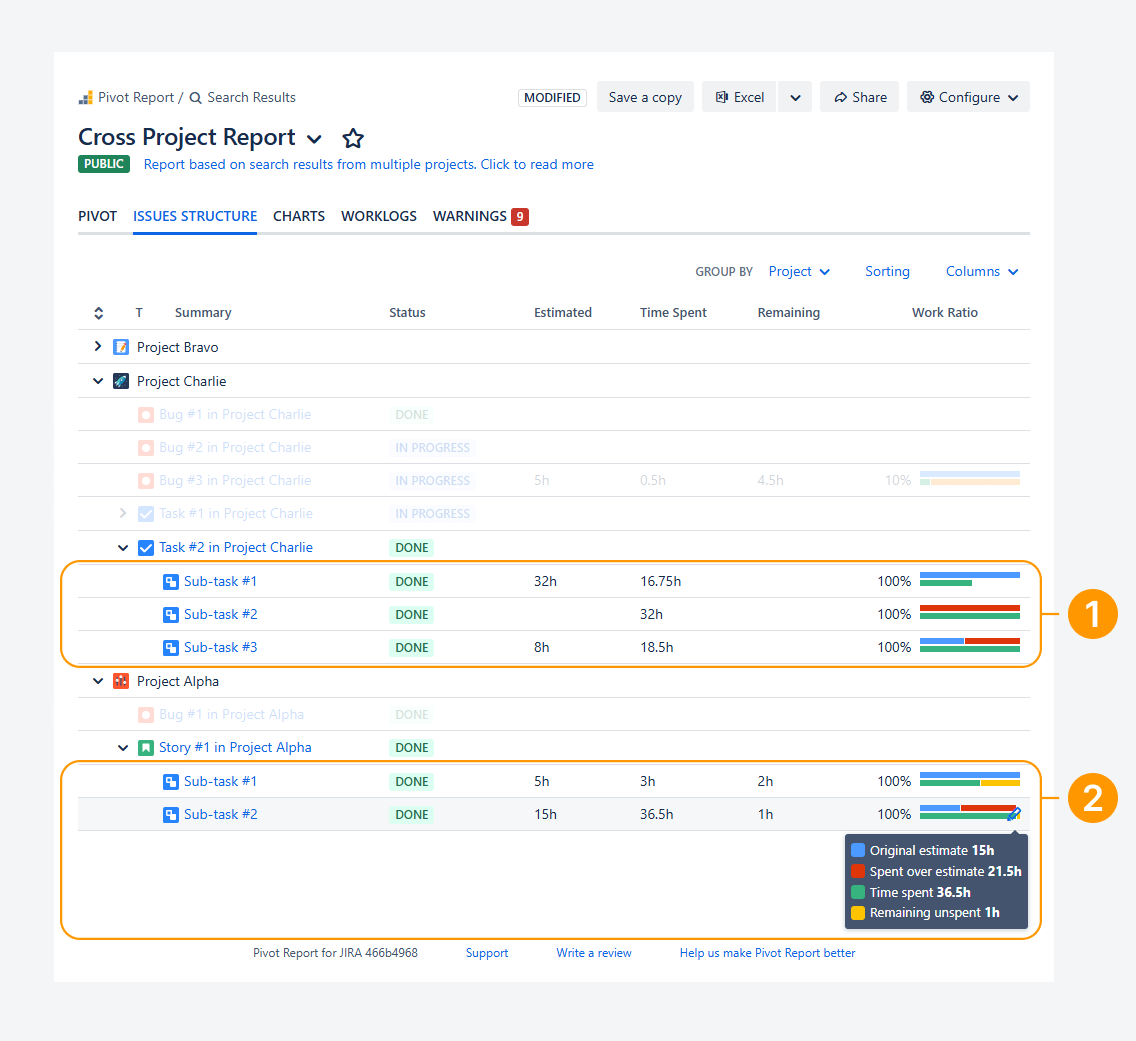
The screenshot above shows examples of how Work Ratio is calculated for closed work items, both when there is no remaining time and when remaining time still exists.
-
In the first example, the Work Ratio is 100% because the sub-tasks are closed and no Remaining Time remains.
-
In the second example, the Work Ratio is also 100% because the sub-tasks are closed. Although some Remaining Time still exists, it is categorized as Remaining Unspent Time, as shown in the tooltip. It is not considered unfinished work.
If you have questions or need assistance, contact our support team via email or service desk. Our team is available Monday through Friday (9:00 AM to 7:00 PM GMT+7) to help with technical challenges or discuss improvements.