
Colined protects your data by not storing it on its servers and by blocking access to the app for signed-out users.
If you are signed out of Jira, you cannot edit reports or use the app’s features, such as the report list. You can only access exported reports to Excel.
You also cannot view embedded reports. Even if a Confluence space allows anonymous access, embedded reports display an error message until you sign in to Jira.
How can you tell if you’re logged out of Jira?
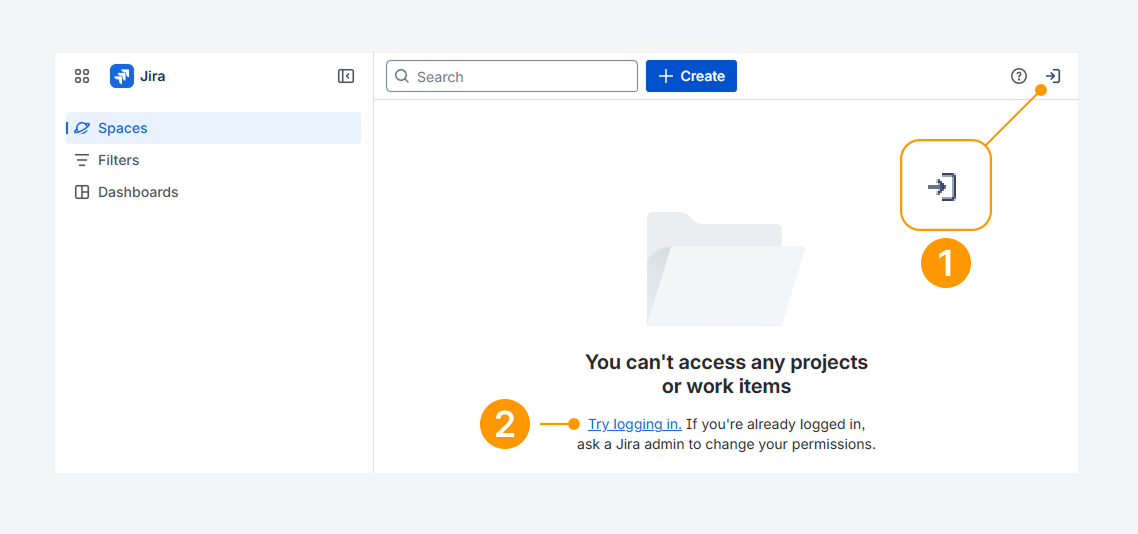
You can tell if you’re logged out of Jira by checking whether:
-
An arrow pointing right is shown the top navigation bar.
-
Spaces, Filters, or Dashboards load as blank pages.
These signs indicate your account is signed out.
Click the arrow or the Try logging in link to log back into your Jira account.
Can you account be logged out due to inactivity?
Yes. Your organization may set an idle session duration, which logs you out automatically after a period of inactivity, as explained in a related Atlassian article.
Also, check your browser’s site data settings, since closing the browser often signs users out.
Will Jira notify you before logging you out?
By default, Jira does not show a warning before ending your session. To change this behavior, see the related Atlassian article.
If you have questions or need assistance, contact our support team via email or service desk. Our team is available Monday through Friday (9:00 AM to 7:00 PM GMT+7) to help with technical challenges or discuss improvements.