
Loading time
Can you decrease the report’s loading time?
Yes. The number of issues in the report source directly affects Jira’s API performance, which determines the report’s loading time—not Pivot Report itself.
-
To speed up loading, reduce the number of referenced issues or those added through extensions (parent or child issues).
-
Also, specify which projects or boards Jira should search. A narrower search scope means fewer issues for Jira to process, resulting in faster results. Atlassian’s documentation offers additional JQL optimization tips.
In Jira Data Center, alerts help identify slow and complex JQL queries, including those with many custom fields. Atlassian provides detailed thresholds for these alerts in a separate article.
Can reports display more issues than Jira, and what is the impact?
Yes. Reports can display more issues than a board or the Issue Navigator. However, loading time increases as the issue count grows.
Working with high issue count in Cloud
Atlassian notes that searches have no issue limit, but display limits apply:
-
Boards and backlogs show up to 5,000 issues.
-
The Issue Navigator shows only the first 1,000 issues.
A report can help you work around certain Jira limits, though it may increase loading time. For example, a board may fail to load if it reaches the maximum issue limit.
In contrast, you can create a report based on the board or its underlying source filter. However, this report may take longer to load compared to one linked to a board that has not reached the maximum limit.
Working with high issue count in Data Center
The display limit for the Issue Navigator can be increased using a documented workaround. A report does not require this workaround, although very large reports may load more slowly.
Similarly to prior example, a report linked to a board or its underlying source filter may take longer to load if the workaround was applied to increase the limit.
Loading error
How can you resolve the “Something went wrong” error while loading Pivot Report?
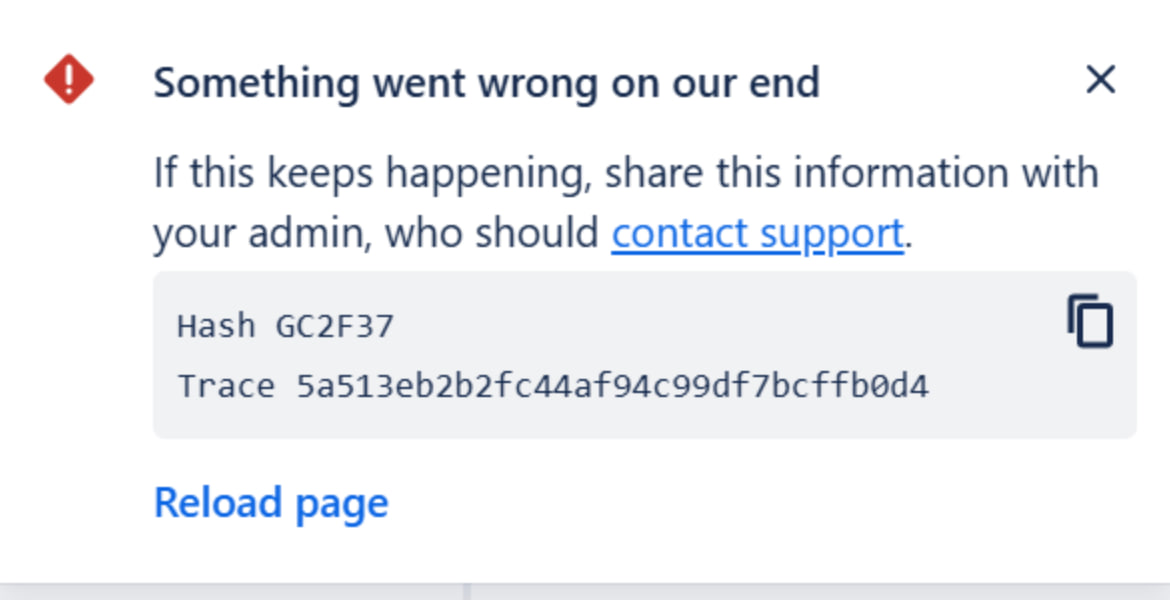
This error may appear when the app loads slowly and then fails. Common causes include:
-
Expired access token – Reload the page to see if the error no longer appears.
-
Firewall restrictions – Your firewall may be blocking the atlassian.net domain. Although .net is a common top-level domain, some customers have recently needed to explicitly allow it.
If you have questions or need assistance, contact our support team via email or service desk. Our team is available Monday through Friday (9:00 AM to 7:00 PM GMT+7) to help with technical challenges or discuss improvements.