
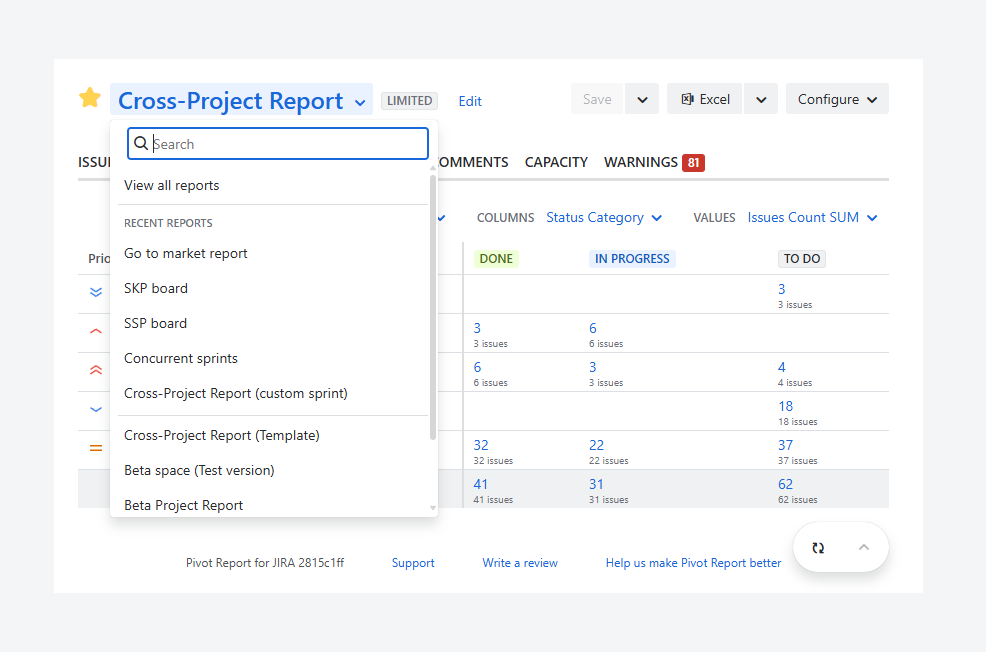
You may have reached this article after being unable to locate a report that you or another user previously created.
This article explains how to find and filter the list of saved reports you have permission to access.
How can you find a report?
You can find your report by:
-
using the search box and dropdown list of most recent reports, within a report
-
using the Manage Pivot Reports page, which lists all reports that you can access in your Jira instance
If a report does not appear in the search results, it may be due to your user permissions, the report being archived, or your user being signed out of Jira.
If you are a Jira admin and want to access the full list of reports, see the related article.
You can find your report by:
-
using the search box and dropdown list of most recent reports, without leaving a report
-
using the Manage Pivot Reports page, which lists all reports that you can access in your Jira environment
If a report does not appear in the search results, it may be due to your user permissions, the report being archived, or your user being signed out of Jira.
If you are a Jira admin and want to access the full list of reports, see the related article.
Within a report
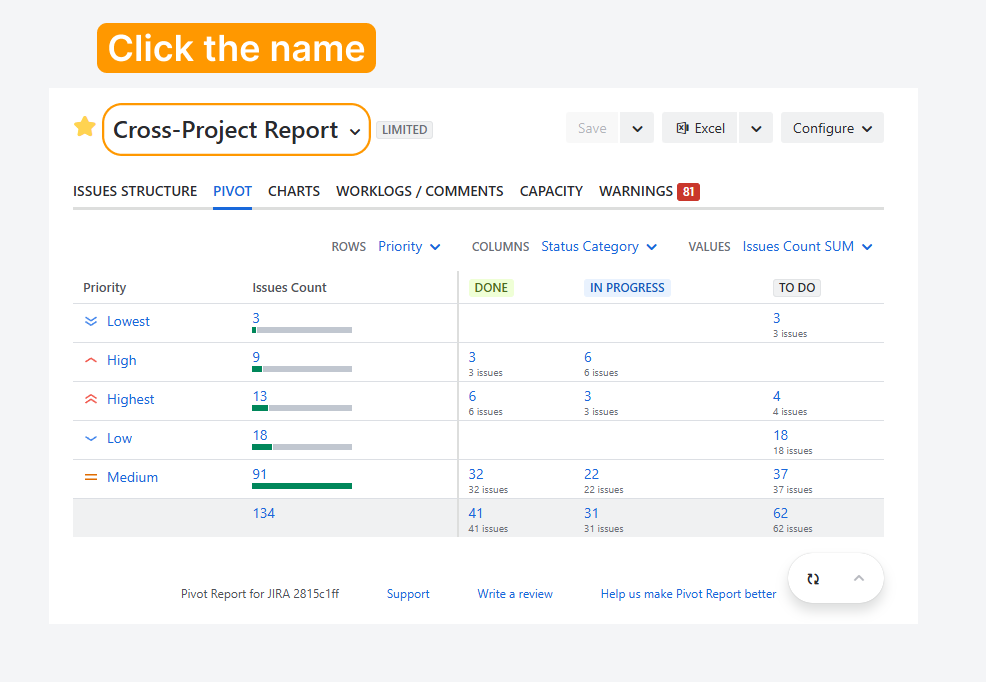
The header section includes a search box and a dropdown list of recent reports to help you locate a report. Follow these steps to access them:
-
Click the report name to open the dropdown.
-
Enter the report name you are looking for in the search bar. You can locate the report by spotting the highlighted keywords in the results.
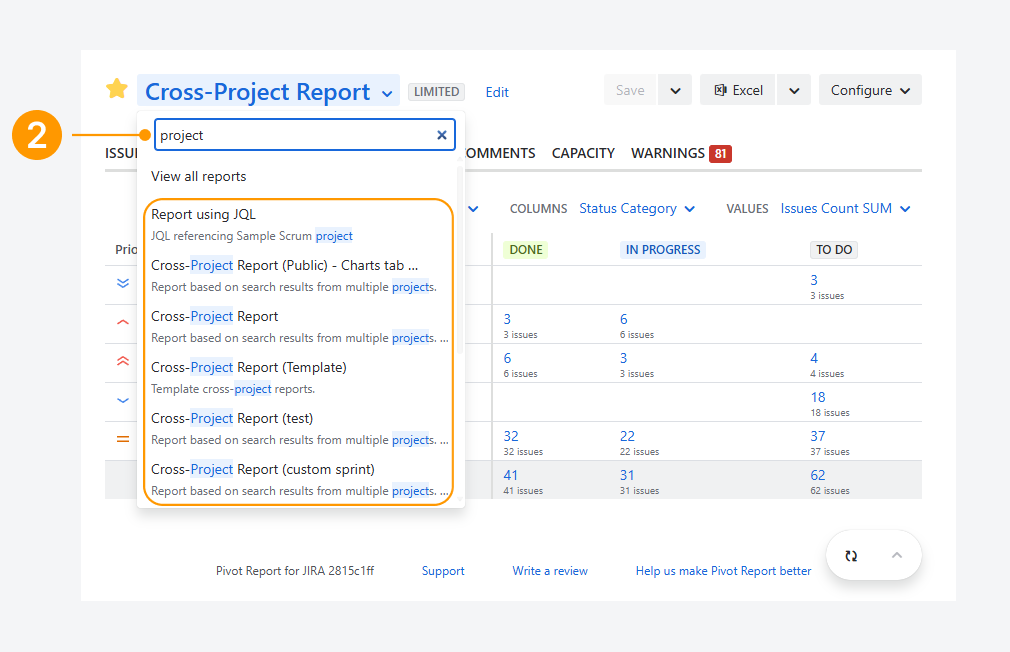
You can also use one of the additional options in the dropdown:
-
Click View all reports to open the list of reports on the Manage Pivot Reports page.
-
In the Recent Reports section, review the five reports your Jira user accessed most recently, ranked from newest to oldest.
-20260311-013226.png?cb=cf443e16851fc593682b6a918910469f)
Within the Manage Pivot Reports page
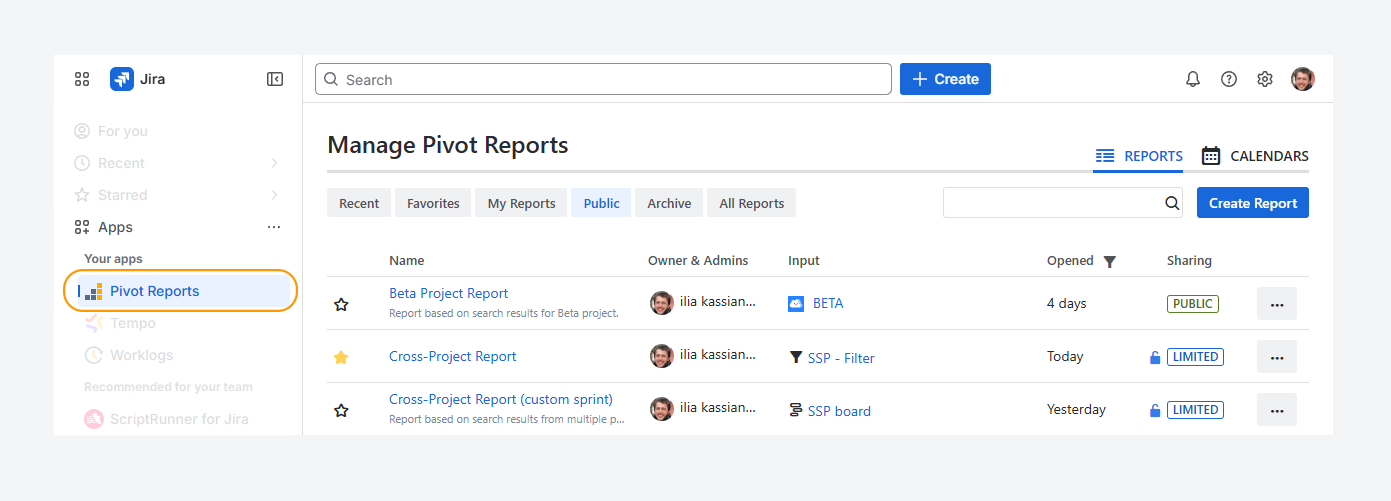
The Manage Pivot Reports page lets you find a report using a search box, six predefined filters, and the Opened column. You can access this page from the sidebar or the Space navigation by following these steps.
Sidebar
Open the Apps list from Jira’s sidebar, and click Pivot Reports.
Space navigation
-
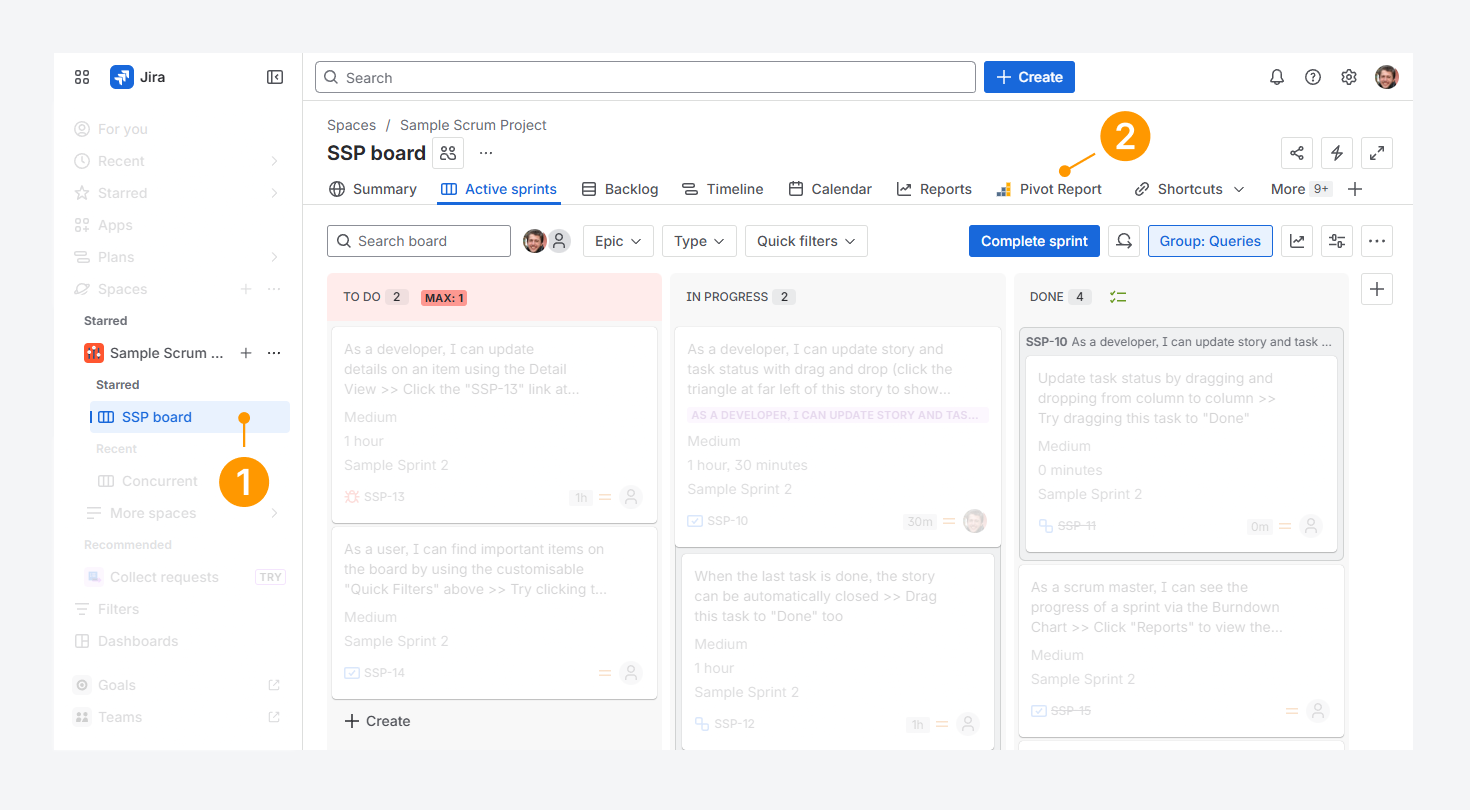
From the Jira sidebar, click Spaces, select your space, and open a board. It can part of a Company-managed or Team-managed space.
-
Click the Pivot Report tab appearing in the navigation.
-
The Manage Pivot Reports page appears inside the space navigation.
-20260311-025700.png?cb=7a8519ade810646dcc029ce5acbed313)
If Pivot Report tab is missing from the navigation in Jira Cloud, check if it is disabled by following the steps listed in a related article.
Features and use cases
Hide a report from search results or restore it
Archived reports are hidden from the other five filters on this page and from search results in the report dropdown. You can use archiving to hide reports or unarchiving to show them again.
Hide a report
Archive a report when it is no longer in use or to reduce the number of reports appearing in search results:
-
Select any of the five filters except Archived Reports.
-
Click the actions (•••) menu next to the report.
-
Select Archive from the dropdown.
-20260310-234330.png?cb=a6d9aae7638cd466dcb5cf588bd15319)
Show a report
Unarchive a report when it is being used again or to make it appear in search results:
-
Select the Archived Reports filter.
-
Click the actions (•••) menu next to the report.
-
Select Unarchive from the dropdown.
-20260310-234741.png?cb=f4bc69378684697c47e86041ed8b202c)
Refine your search using predefined filters
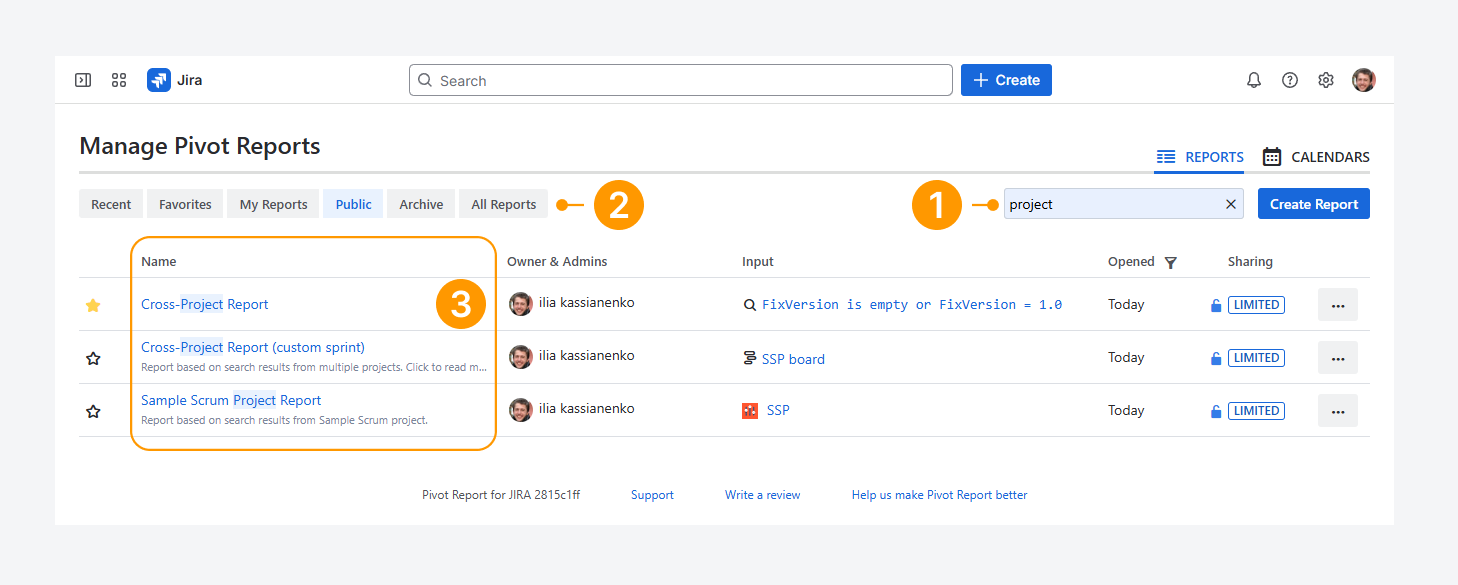
You can use this page to locate a report from the list, by searching for keywords, using predefined filters, or combining both methods.
These filters help you find reports based on ownership or sharing permissions, such as reports you own or reports shared with everyone. To learn more about report sharing types, refer to the related article.
-
Enter keywords from the report name in the search bar.
-
Click one of the six predefined filters:
-
Recent Reports: Shows reports your Jira user accessed recently. However, these reports are not sorted by the most recent access date. Refer to the the Opened column, is explained in the next section, for to locate the access date.
-
Favorites: Shows reports you marked as favorites by clicking the star icon next to the report title in the top-right area of the report view.
-
My Reports: Shows reports that you own.
-
Public Reports: Shows reports that all users in your organization can access within the Jira instance.
-
Archived Reports: Shows reports you have archived. Archived reports are hidden from the other five filters. They are also excluded from title searches and do not appear in All Reports, even if the sharing permission is set to Public.
-
All Reports: Shows a combined list of Favorites, My Reports, and Public Reports.
-
You can also locate a report by spotting the highlighted keywords in the search results.
Hide a recent report from search results
Reports can be hidden from the Recent Reports filter on this page and from search results in the report dropdown.
Hide a report
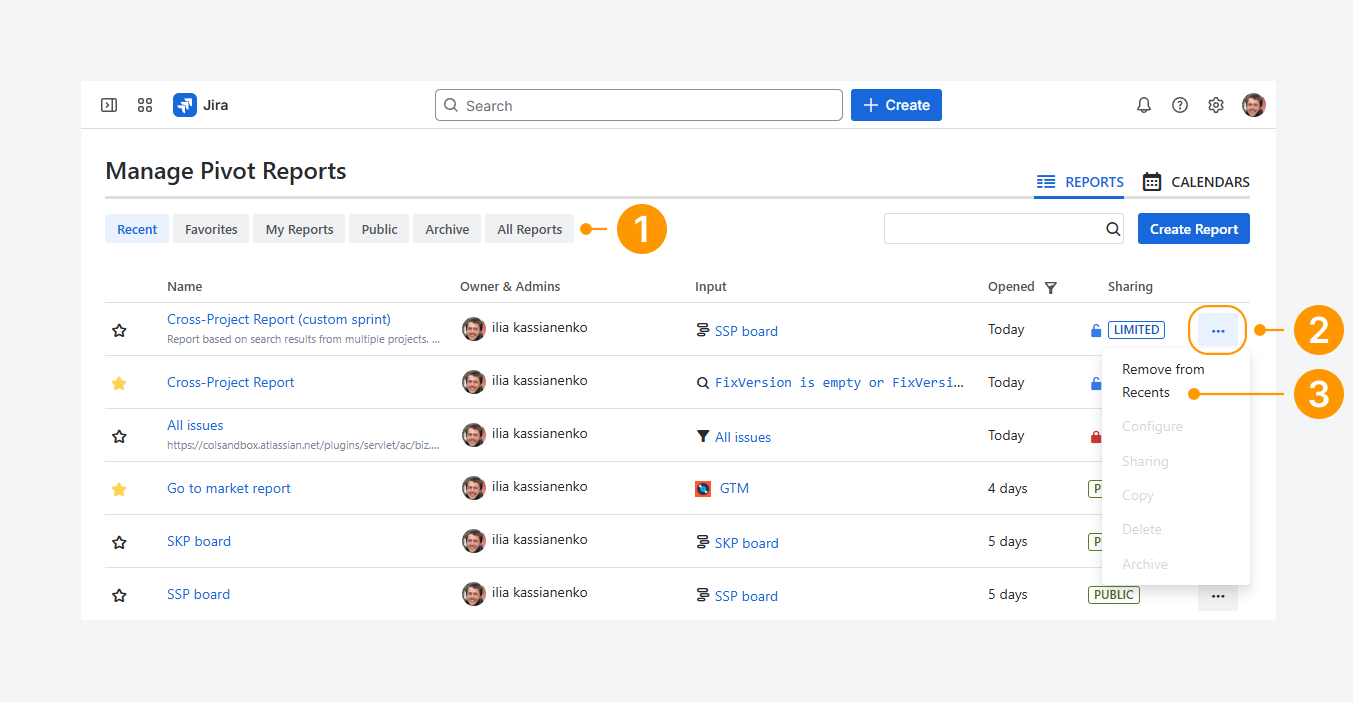
Hide a report when it is meant for occasional private use or when you want to reduce the number of reports shown in search results:
-
Select any of the five filters except Recent Reports.
-
Click the actions (•••) menu next to the report.
-
Select Remove from Recent from the dropdown.
Show a report
When you hide a report, the change applies only to your Jira user. It does not affect what other users see when they open the Recent Reports filter in their browser.
If another user updates the report, it will not appear again in your Recent Reports list until your Jira user makes changes to it.
Filter reports based on their last date of activity
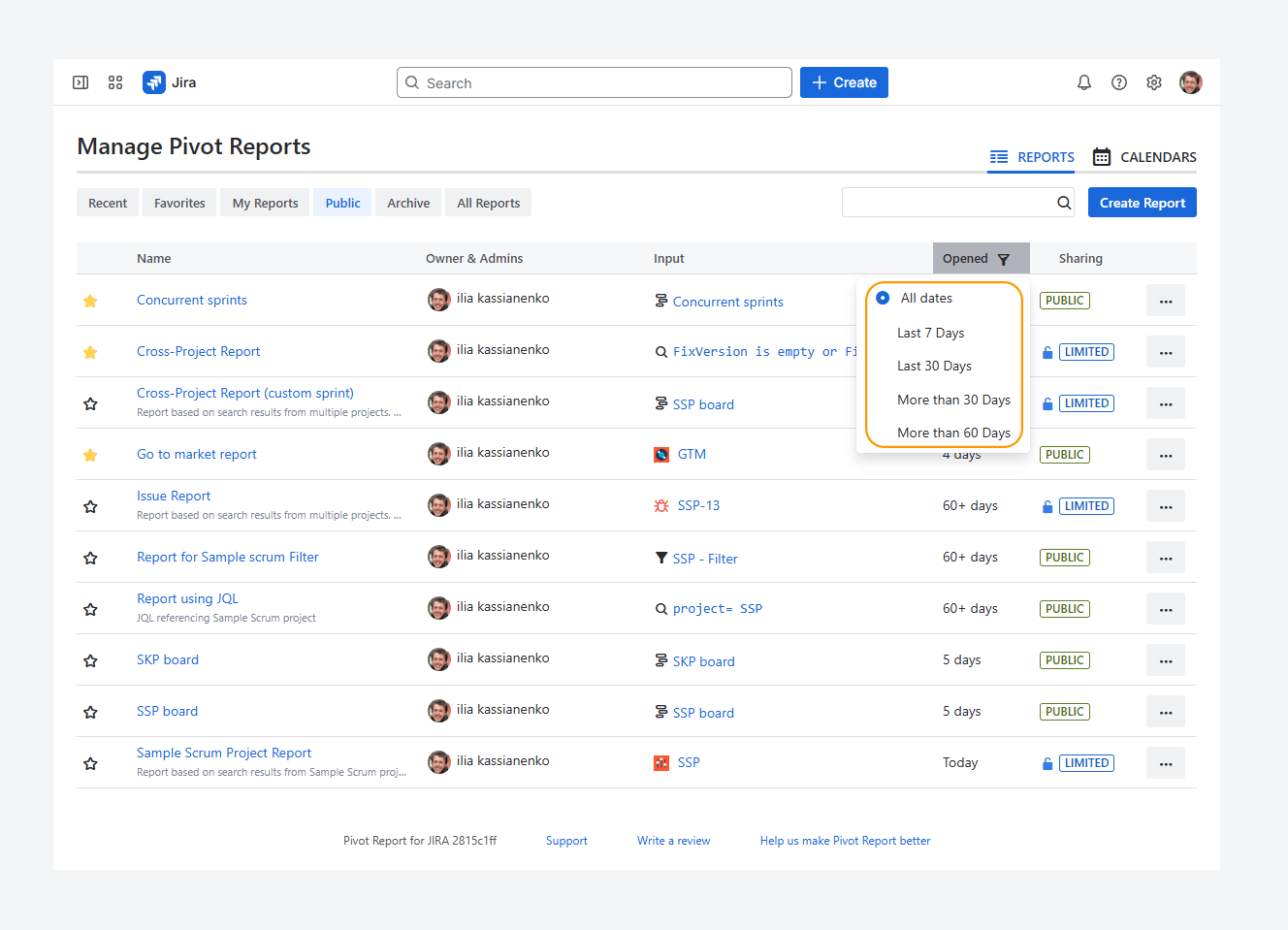
You can filter reports using the Opened column. In this filter, you can choose to display reports opened within specific time frames, such as the last 7 or 30 days.
If you review reports at different intervals—daily, weekly, monthly, or annually—this column helps you find them faster based on the time frame you need.
Display reports with the same name and tell them apart
When searching for a saved report using the methods described in this article, you may find multiple reports with the same name.
You can distinguish them on the Manage Pivot Reports page by reviewing the Owner, Input, Last Opened, and Sharing type columns.
In some cases, such as the example below, reports may have the same name, sharing type, and owner. In these situations, you can identify the correct report by checking the Input (report source) column.
-20260311-021334.png?cb=79251ce0e4488cce6cff2aa49c7d328b)
To avoid confusion, assign each report a unique name when creating or copying it. This helps ensure that you select the correct report during your search.
FAQ
Why can you see Limited reports for the Public filter?
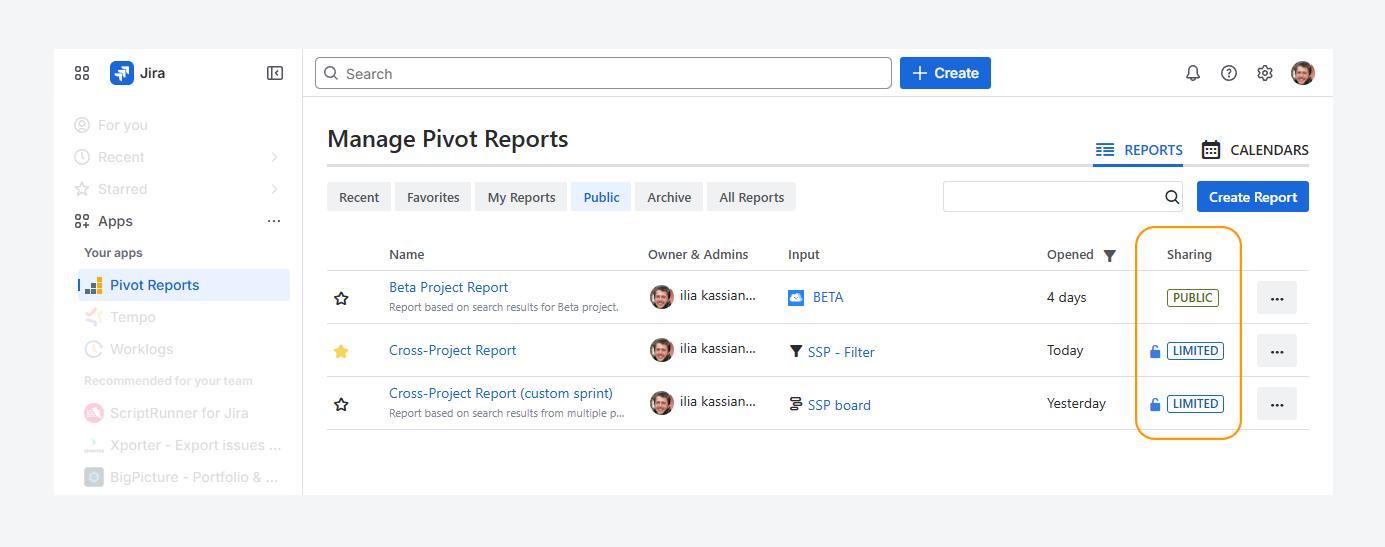
On the Manage Pivot Reports page, when using the Public predefined filter, Limited reports appear only if you are the report owner, a report admin, or part of a user or group with access.
If you do not meet these conditions, Limited reports do not appear when this filter is applied.
Troubleshooting
Can a signed-out user access a report?
No.
Colined protects your data by not storing it on its servers and by blocking access to the app for signed-out users.
If you are signed out of Jira, you cannot edit reports or use the app’s features, such as the report or calendar list. You can only access exported reports, including Excel files, HTML snapshots, and PDFs.
You also cannot view embedded reports. Even if a Confluence space allows anonymous access, embedded reports display an error message until you sign in to Jira.
How can you tell if you’re logged out of Jira?
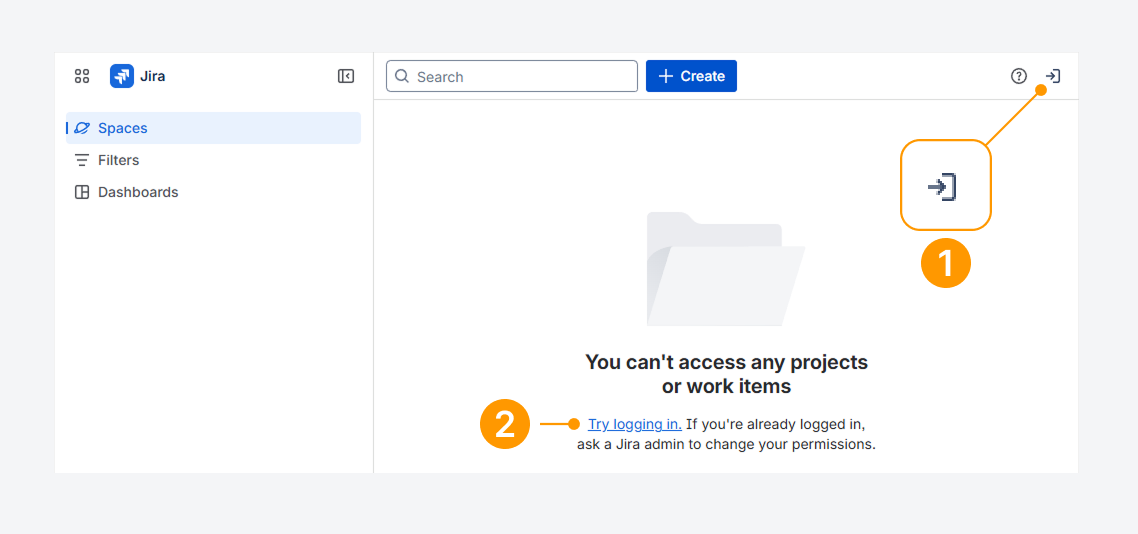
You can tell if you’re logged out of Jira by checking whether:
-
An arrow pointing right is shown the top navigation bar.
-
Spaces, Filters, or Dashboards load as blank pages.
These signs indicate your account is signed out.
Click the arrow or the Try logging in link to log back into your Jira account.
Can you account be logged out due to inactivity?
Yes. Your organization may set an idle session duration, which logs you out automatically after a period of inactivity, as explained in a related Atlassian article.
Also, check your browser’s site data settings, since closing the browser often signs users out.
Will Jira notify you before logging you out?
By default, Jira does not show a warning before ending your session. To change this behavior, see the related Atlassian article.
Can you lose access to a report?
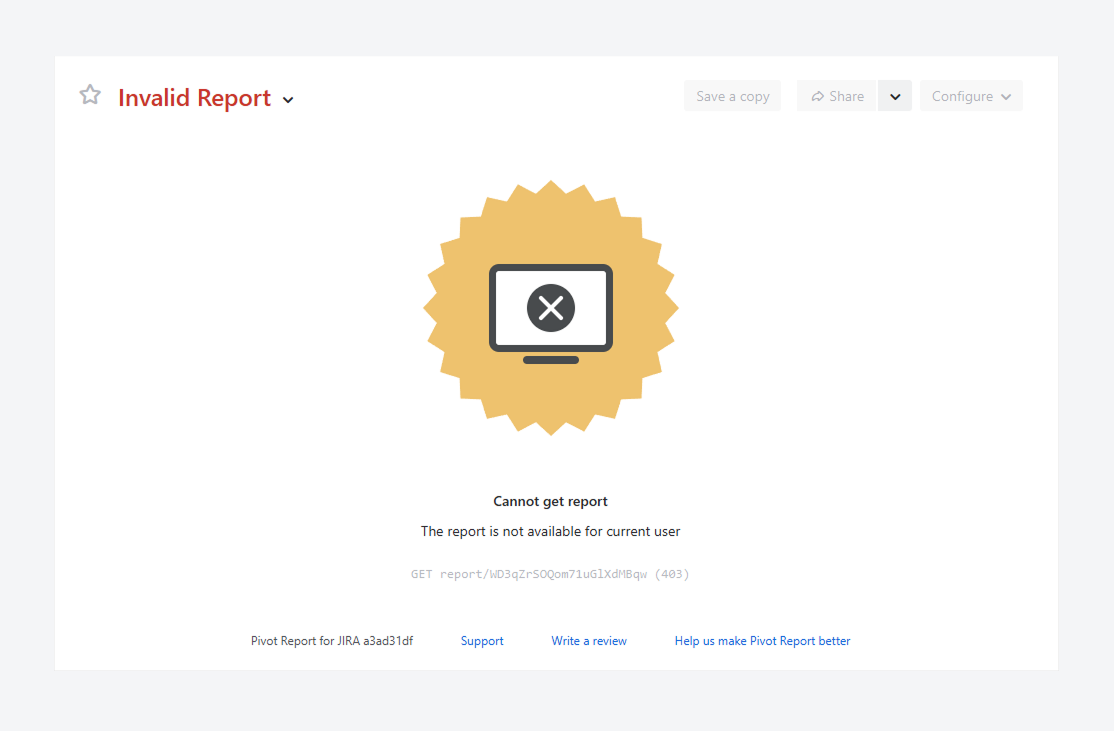
Yes. The error message above appears when you try to open the URL of a report you no longer have permission to view, even if you previously had access.
If another message appears, verify whether you have access to the report source, by following the steps mentioned in a related article. Similarly, if a blank page appear instead of a message, verify if you have access to the app.
After confirming that you are signed in by following the steps in the previous troubleshooting section, follow the steps in a separate article to check and restore your access to the report.
Can you lose access to a report source?
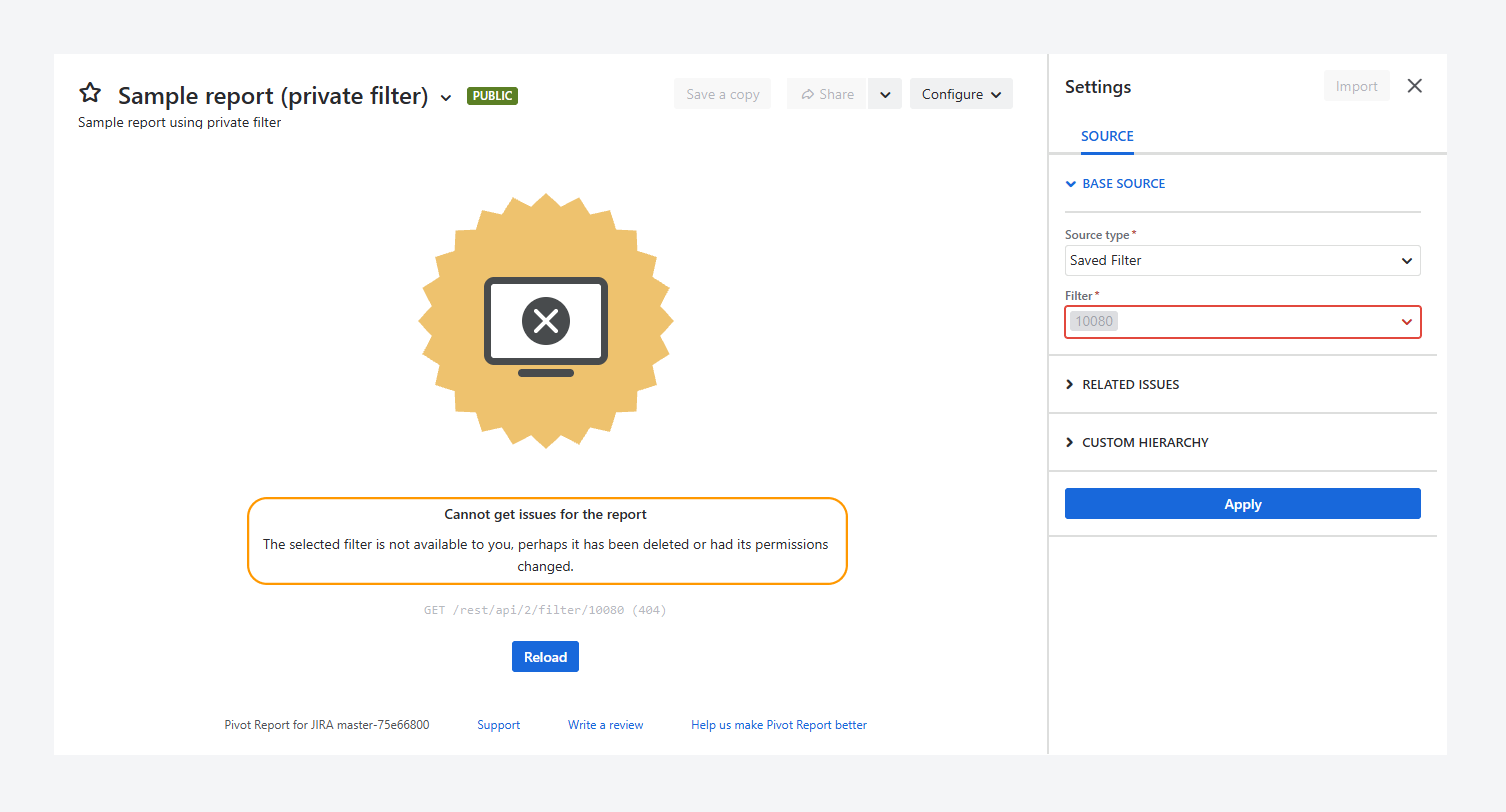
Yes. You can lose access to a report source, as shown in the screenshot above.
The error message appears when you try to open the URL of a report whose source you no longer have access to, even if you previously had access.
To verify and restore access, follow the steps listed in a separate article.
Why does the Opened Column show n/a?
-20260311-022204.png?cb=986239c8a40c9f617c933ea3ad76003f)
When you modify the report name, source, or sharing settings, the Last Opened column resets to N/A until the report is opened again.
If you have questions or need assistance, contact our support team via email or service desk. Our team is available Monday through Friday (9:00 AM to 7:00 PM GMT+7) to help with technical challenges or discuss improvements.